
Features
See educational value.
An optional step when you log a moment. It names the learning that is already there, in the language an assessor reads. It is off until you turn it on.
What it does
You write what happened, in your own words. When you press See educational value, a short note appears under it, saying what that moment shows. Suggested key skills and subjects are added to your tags.
Your words are never changed. The note sits in its own box. You can edit it, write a new one or remove it. Nothing is saved until you press Save.
An example
- Moment
- Spent the afternoon taking apart the old radio from the shed. Sorted the screws by size into an egg box, then wanted to know how the speaker makes sound. We looked it up together.
- Educational value
- Managing Information & Thinking: Sorting the screws by size into an egg box is organising what came out of the radio. Wanting to know how the speaker makes sound is curiosity that went past the taking apart. Managing Myself: Taking on the radio as a project and staying with it for the afternoon. Looking up the speaker question together put that curiosity into a next step.
- Tags
- Managing Myself · Managing Information & Thinking · Science
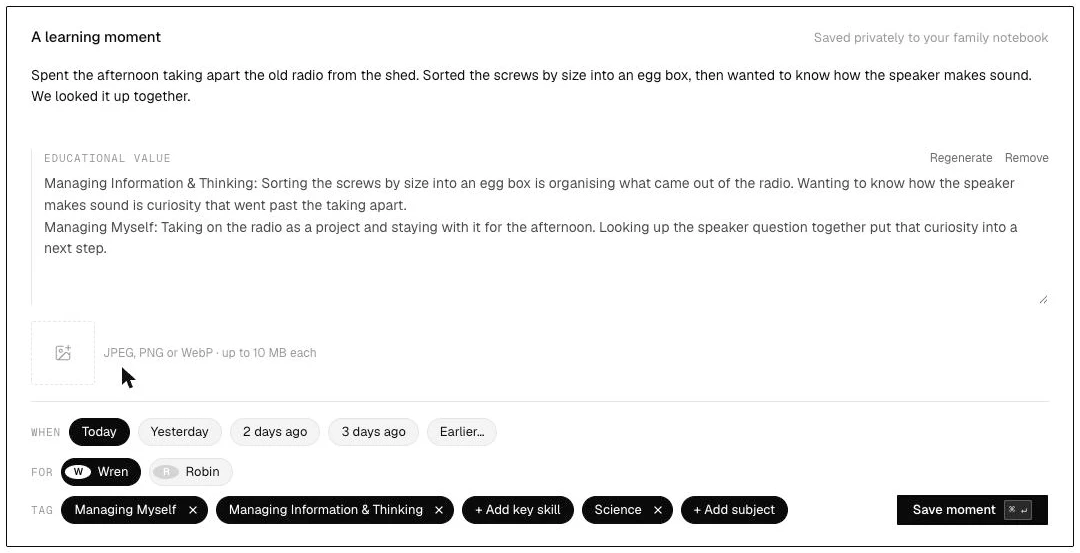
The note is written fresh each time, so the wording varies.
Off by default
E Squared has one AI feature, and this is it. It is off for every family until a parent turns it on.
No AI ever speaks to the child. Nothing on the child's side shows it or uses it.
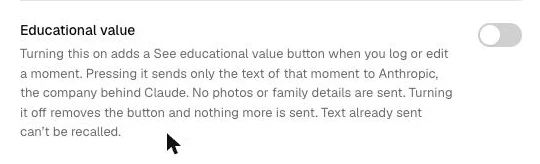
What gets sent
When it is on, the text of that one moment goes to Anthropic, the company behind Claude. It goes only when you press the button. No photos, no profile, no family details. If you wrote a name in the moment, the name goes with it.
Turning it off stops anything new being sent. Text already sent can't be recalled. Notes already saved stay on their moments. The full detail is on the privacy page.
Where to find it
The switch is in Family settings, under Educational value. A parent with add and edit access can change it. Tutors can't.
Once it is on, the button shows in the form when you log or edit a moment. It needs a few words first.
In the report, the note always sits under the original moment. It is never shown on its own.
They lead. The record follows.
e², as in twice exceptional.